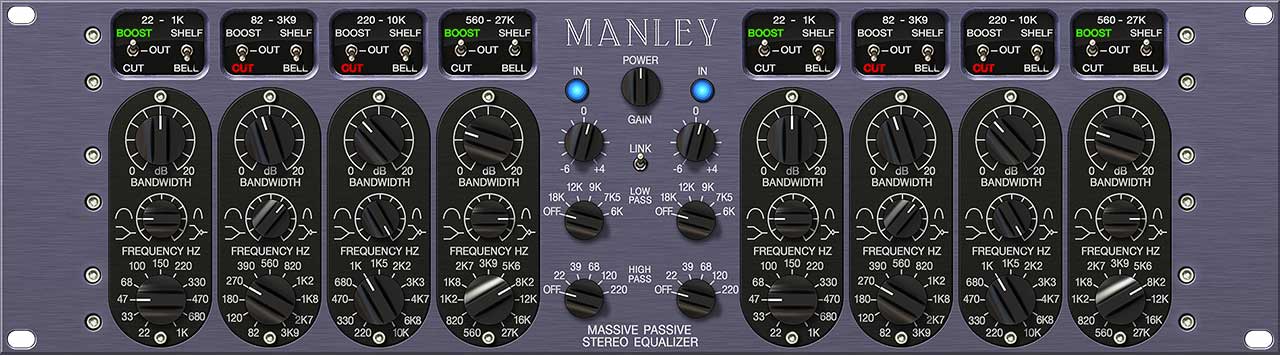
The Universal Audio Manley Massive Passive EQ is a plugin that accurately emulates one of the most legendary analog equalizers in the world. Known for its ability to shape sound with unique warmth and musicality, this equalizer is an essential tool for both mixing and mastering. Below, we’ll explore its key features and provide a step-by-step guide on how to use it effectively.
What Makes the Massive Passive Special?
The Massive Passive is a passive equalizer that uses gain amplifiers to restore the level after applying adjustments to frequency bands. Unlike conventional digital equalizers, this equalizer introduces analog character through its transformers and high-quality components. Its key features include:
- Passive Design: It doesn’t use active circuits to cut or boost frequencies, contributing to its warm sound.
- Natural Resonance: The filters interact musically, making it ideal for adjusting frequencies without sounding artificial.
- Dual Mono or Stereo: It allows for independent work on each channel, which is useful for stereo mixes or mastering.
- Smooth Curves: Its frequency bands sound highly musical, even when making drastic adjustments.
Plugin Interface
- Frequency Bands: The Massive Passive has four bands per channel, each with controls for frequency, gain, and curve type (bell or shelving).
- Cut Filters: It includes high and low cut filters, useful for removing unwanted frequencies at the edges of the spectrum.
- EQ/BYP Mode: Allows you to activate or bypass the equalization effect to compare with the original sound.
- Band Toggle: Each band can be activated or deactivated independently.
- Output Gain: Controls the overall level of the processed audio.
How to Use It in a Project
- Prepare Your Project: Insert the Massive Passive into the channel you want to process. This could be on individual tracks (like vocals, guitars, or bass) or on the master bus.
- Analyze the Audio: Listen to the material and identify which areas of the spectrum need adjustments. For example:
- Is the bass too dull or lacking clarity?
- Do the upper mids sound harsh?
- Is the brightness in the highs insufficient?
- Adjust Frequency Bands:
- Select the appropriate band for the frequency you want to modify.
- Adjust the band’s frequency using the frequency control.
- Increase or decrease the gain using the boost/cut control.
- Choose the curve type (bell or shelving) depending on the desired effect. Bell curves are ideal for focused adjustments, while shelving is better for boosting or attenuating a wide range.
- Use the Cut Filters:
- Remove unnecessary low-end frequencies using the low cut filter.
- Use the high cut filter to smooth out overly bright highs or filter out high-frequency noise.
- Mono or Stereo Mode: When working on a stereo mix, experiment with different adjustments for the left and right channels. This can add depth and dimension to the sound.
- Output Control: Adjust the output level to ensure the volume is neither too high nor too low when compared to the unprocessed audio.
Practical Tips
Become an expert in equalization with the recommended book “ EQ in Music Production” (click on the image to go to the link):

- For Vocals: Use the Massive Passive to add body to vocals (by slightly boosting the lows) and add brightness to the highs for better clarity.
- For Guitars: Enhance the midrange frequencies to make guitars stand out in the mix while cutting unnecessary low-end with the low cut filter.
- On the Master Bus: Apply a subtle boost to the lows and highs to add depth and air to the final master. Avoid extreme adjustments to maintain transparency.
- Less is More: While the Massive Passive allows for drastic adjustments, its magic lies in subtle touches. Small changes can make a significant impact.
Common Mistakes
- Excessive Boost: Applying too much gain can saturate the mix or introduce unwanted resonances.
- Ignoring Cut Filters: Not using filters to clean up unwanted frequencies can leave elements like background noise or low-frequency clutter.
- Failing to Compare: Always toggle between active and bypass modes to objectively evaluate the changes you’ve made.
The Universal Audio Manley Massive Passive EQ is not just a technical tool but a creative instrument that allows you to sculpt sound in a musical way. With practice and attention to detail, this plugin can transform your mixes and masters, giving them the professional character that defines the best productions. Experiment and discover how this legendary equalizer can elevate your work!